Setup engineer
Tell it the rear steps out on power. It answers with the exact change, why it helps, and what it costs you.
- Reads your setup live from the game
- At most three changes, ranked
- Writes the setup file where the game allows it
 BOXBOX
Open the app
BOXBOX
Open the app
AI race engineer for sim racing
BoxBox reads your car and your laps, listens to what the car is doing to you, and tells you exactly what to change. It analyses your telemetry, coaches you corner by corner, and checks on the next run that every change worked.



What it does
Tell it the rear steps out on power. It answers with the exact change, why it helps, and what it costs you.
Every lap is kept as a trace of every channel the simulator publishes, ready to overlay and compare.
Your lap against your best in that car at that circuit: the corners where the time went, and what you did differently in each.
After a change, one question: better, same or worse? BoxBox weighs your answer with the lap times and the data, and learns what works for you.
Setup tailoring
Where it happens: braking, turn-in, mid-corner, exit. What: understeer, snappy, won't rotate. How bad. Three taps, or say it out loud. BoxBox checks your complaint against the lap you just drove and answers in a second or two.
It speaks each game's language, click for click, and flips the sign where a game numbers an adjuster backwards. For a car it has not been told about, it says it is estimating, with a confidence figure on every value.
Less lock under power lets the inside rear spin up a few rpm instead of dragging the whole axle into yaw.
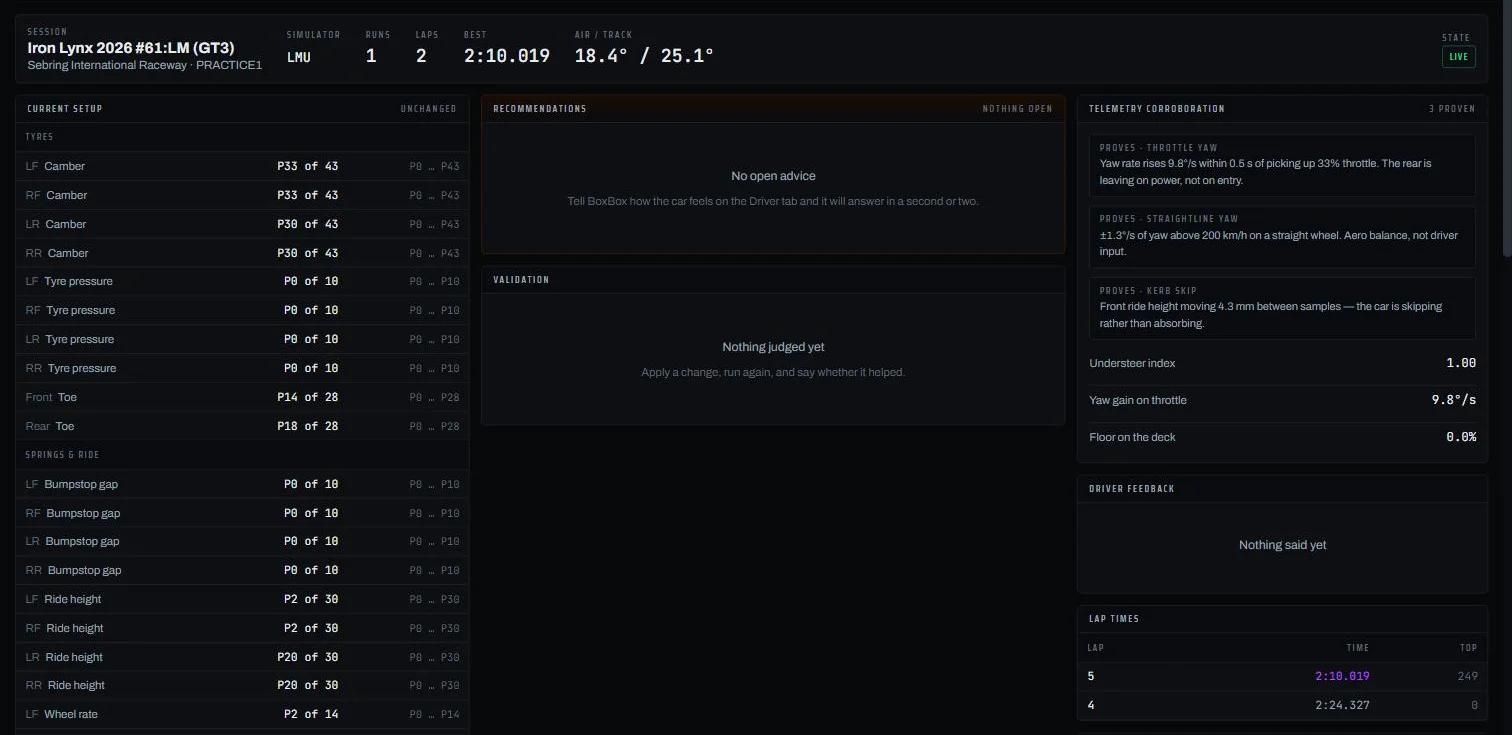
Telemetry proves Yaw rate rises 8.9°/s within 0.5 s of picking up 21% throttle. The rear is leaving on power, not on entry.
Costs you a slightly lazier drive off the slowest corners, and a touch less traction on exit kerbs.
Coaching · Race & Pro — Telemetry analysis · Pro
Overlay up to four laps. The delta shows where you gained and lost; coaching names the corner and the reason; every recommendation opens the traces that prove it.
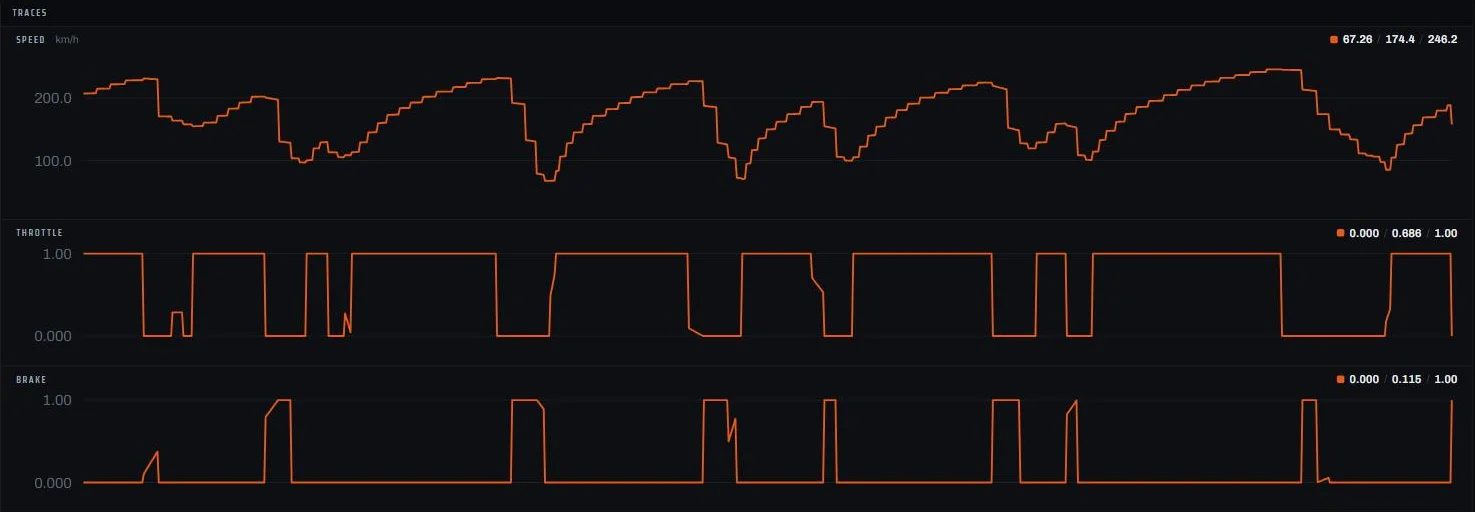

Corner 3 · −0.31s Brake a touch later.
An example of the wording. The corners and the numbers come from your own laps.
The console
The setup as the game reports it, what the last lap proved, what you said, what to change, and whether the last change worked. On a second monitor, or on the phone in your rig.

How it works
One file on your sim PC. Sign in with your BoxBox account. No simulator account is ever linked.
It finds the game on its own, captures the setup and records every lap, live on any screen.
Say how the car feels, take the change it proposes, and look at where the last lap went.
Better, same or worse, judged against the lap times and the data. It remembers, for this car and for you.
Simulators
Install the collector, start the game, drive. BoxBox finds the simulator on its own.
| iRacing |
Le Mans Ultimate |
|
|
|---|---|---|---|
| Reads your car and your laps live | ✓ | ✓ | ✓ |
| Reads your setup | ✓ | ✓ | ✓ |
| Setup advice for every car | ✓ | ✓ | ✓ |
| Writes the new setup into the game | You type the change in | ✓ | ✓ |
| Telemetry analysis and coaching | ✓ | ✓ | ✓ |


Pricing
Start free. Race is the setup engineer and the coach for every car; Pro adds the analyst and the fastest drivers as your reference. Cancel whenever from the app. Nothing you recorded is deleted, on any plan.
| Garage €0 Try it on one simulator Start free | Most drivers Race €9/month €89 a year · setups and coaching Try 14 days free | Pro €19/month €189 a year · plus analysis and pro references Try 14 days free | |
|---|---|---|---|
| Setup engineer | |||
| Setup changes from how the car feels | 10 a month | Unlimited | Unlimited |
| Simulators | One | All | All |
| Setup file written into the gameLMU and ACC · iRacing gets a change list | — | ✓ | ✓ |
| Every change checked on the next run | ✓ | ✓ | ✓ |
| Learns which advice works for you | — | ✓ | ✓ |
| Telemetry analyst | |||
| Live telemetry and setup reading | ✓ | ✓ | ✓ |
| Every lap kept as a full tracerecorded on every plan | ✓ | ✓ | ✓ |
| Lap overlays, delta, track map | — | — | ✓ |
| Friction circle, distributions, CSV export | — | — | ✓ |
| Advice linked to the traces behind it | — | — | ✓ |
| Driving coach | |||
| Corner-by-corner tips for your next lap | — | ✓ | ✓ |
| Choose tips per lap, corner phases and inputsbraking, turn-in, mid-corner, exit · brake, throttle, steering, speed | — | ✓ | ✓ |
| Coached against your own best lap | — | ✓ | ✓ |
| Coached against the fastest BoxBox driverslaps drivers chose to share, shown anonymously | — | — | ✓ |
| Coached against your Garage 61 lapsyours and your teammates’, with a linked Garage 61 account | — | — | ✓ |
| Driver profile | |||
| Level, badges and personal bests | ✓ | ✓ | ✓ |
| Sessions shown | Last 30 days | All | All |
Prices include VAT. Yearly is two months free.
One executable on the PC that runs the simulator. It reads the game the same way an overlay does and sends a summary of each lap, plus a compact trace of it — a thousand points round the lap, about fifty kilobytes. The raw 60 Hz stream never leaves your machine, and your simulator account is never touched.
Windows 10 or 11 · 64-bit
Download
SHA-256
boxbox-collector.exe --api https://app.boxbox.app
Windows will warn you. The build is not code-signed yet, so SmartScreen calls it an unrecognised app. That is expected — check the SHA-256 against the download if you would rather not take our word for it.
No. BoxBox never touches your simulator account. The collector runs on your own PC and reads the game the same way an overlay does. If the collector is running, that is the whole integration.
Yes. BoxBox reads published telemetry interfaces and writes setup files into your own documents folder. It never injects into a running game, never touches the driving, and never does anything you could not do yourself with a text editor and more time.
It will make your car match what you are asking of it, and it will tell you honestly when a change did not help. Your profile tracks exactly what proportion of the advice you acted on actually improved the car — we show you that number rather than a testimonial.
You still get advice. BoxBox reads which adjusters the car has from the game itself and applies what cars of its class — GT3, Hypercar, LMP2, Cup — usually do, and the interface labels it a class estimate with a confidence figure per parameter. Every verdict drivers give sharpens those figures for that car.
On our servers. The raw 60 Hz stream never leaves your PC: each lap is sent as a summary and a compact trace, a thousand points round the lap, and those are kept so you can analyse them later. Nothing is deleted when you change plan.